Run the restaurant till locally on your own compatible Windows device.
Free restaurant EPOS for Windows
Free restaurant EPOS software for Windows
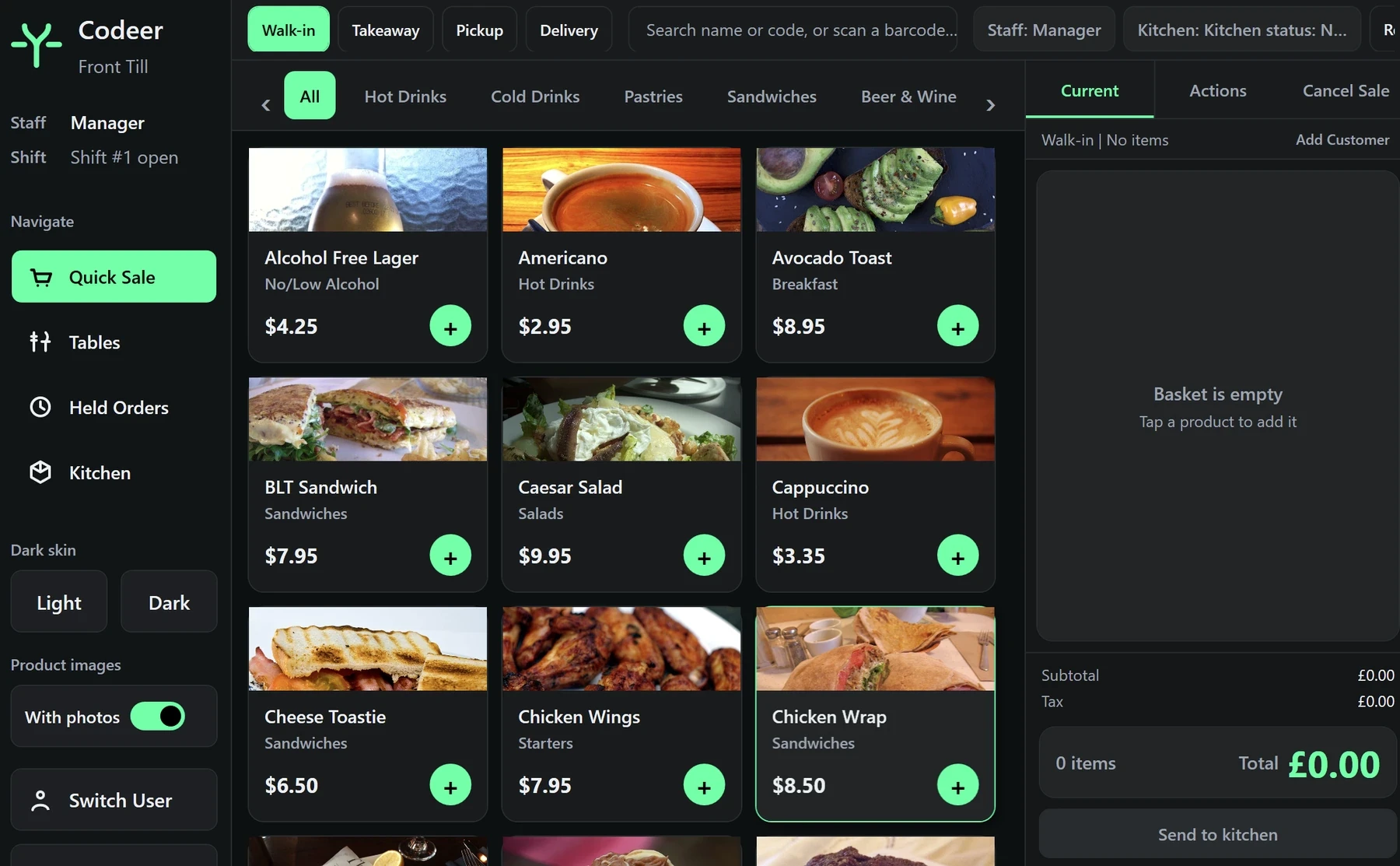
Run tables, walk-ins, takeaways, menus, kitchen orders, receipts and reports from one capable Windows till for £0. Codeer Restaurant EPOS works locally on your own device, with Cloud planned as a separate upgrade; ask about availability.
Free Windows pilot · Register with your business email · No payment card
Codeer Restaurant EPOS · Front tillWindows · Local mode
Planned Cloud upgrade per venue. See all Hospitality plans below.
Choose a prepared touchscreen till, cash drawer and receipt printer setup.
Hospitality pricing
- Free Windows pilot · £0
- Local till, kitchen orders and daily close. The next reporting release gives new Free venues 31 days of sales analysis. Historical transactions, receipts, closes and bookkeeping exports remain available. Existing Free installations keep their local reporting.
- Cloud (planned) · £10 per venue per month
- Planned upgrade with remote reporting, cloud backup and synchronisation, intended to analyse all available sales history and compare periods. Ask about availability; these features are not included in the current local pilot.
- Cloud with Menu Assistance (planned) · £15 per venue per month in total
- Planned package including Cloud and one batch of up to ten menu changes each month. Ask about availability before ordering.
- Initial menu setup · £49 once
- Send your menu and prices. Codeer builds up to 50 items with standard modifiers. You can also enter the menu yourself for free.
Choose your hospitality business
View all EPOS optionsRestaurant software that fits the way service actually runs
This is not generic retail software with a restaurant label added. The workflow is organised around orders, tables, modifiers, kitchen communication and closing a shift cleanly.
Tables, walk-ins and takeaway
Keep table service, counter sales, collection and delivery orders in the same EPOS system. Staff can open a table, hold an order, add notes and move between service types without rebuilding the basket.
Modifiers and kitchen flow
Add cooking instructions, choices and course notes at the till, then send clear orders through to the kitchen. The workflow reduces retyping and keeps front of house and food preparation aligned.
Menus, products and staff
Manage products, categories, prices, staff access and quick keys from one straightforward workspace. Make daily menu changes without waiting for a support ticket.
Receipts and local reporting
Review transactions, sales by hour, average ticket and category performance from the till. The planned Cloud upgrade would add remote reporting and synchronisation. Ask about availability; it is not required for the local pilot.
Practical EPOS for independent restaurants
Codeer is designed for UK restaurants that need clear service workflows without committing to another monthly software bill.
Restaurants and bistrosCasual dining venuesSmall hotels with diningPop-ups and supper clubsTable and counter serviceIndependent hospitality groups
Free restaurant EPOS questions
Is Codeer Restaurant EPOS really free?
Yes. The core Windows till is £0 to run locally. There is no monthly charge for the core software. Hardware and additional services cost extra. Cloud is a planned upgrade at £10 per venue/month; ask about availability.
How do I get the restaurant EPOS software installed?
Register for the free Windows pilot, download the installer and open it on your till. Activate Codeer POS Command Centre online with the same business email. For assisted installation, contact Codeer for a quote.
Does it support tables and takeaway orders?
Yes. The till is designed to handle table service, walk-ins, collection and delivery order types from the same workspace.
Can I use my existing computer?
Yes, if it is a compatible 64-bit Windows 10 or Windows 11 device. You can also choose a complete Codeer touchscreen EPOS hardware setup.
What is planned for the £10 Cloud upgrade?
The planned Cloud upgrade is intended to add online backup, synchronisation and remote reporting. Ask about availability. It is optional, and the free local Windows till does not stop working if you do not subscribe.
Does the till work without the internet?
The core till is designed to run locally, so day-to-day selling is not dependent on a constant cloud connection. Online services naturally require internet access.
Try the free restaurant EPOS pilot
Register once to download the Windows installer. For help with hardware or installation, contact Codeer.
Codeer restaurant EPOS · Order, kitchen and close
Follow an order from the till to the kitchen
Two customers order the same main with different instructions. Can the cook tell them apart, see a change and avoid making a duplicate meal? Our recorded Free 2026.1.11 pilot test answered that kitchen question. Use the payment and close-out checks below to finish evaluating your restaurant setup.
Test scope: the screenshots and saved test log are from 9 November 2026. This was an automated Pickup order on a Windows 11 virtual machine with a separate sample menu, not a dine-in table-service test. No card payment, paper printing or end-of-day close was performed in that run. Those steps below are checks for your own trial.
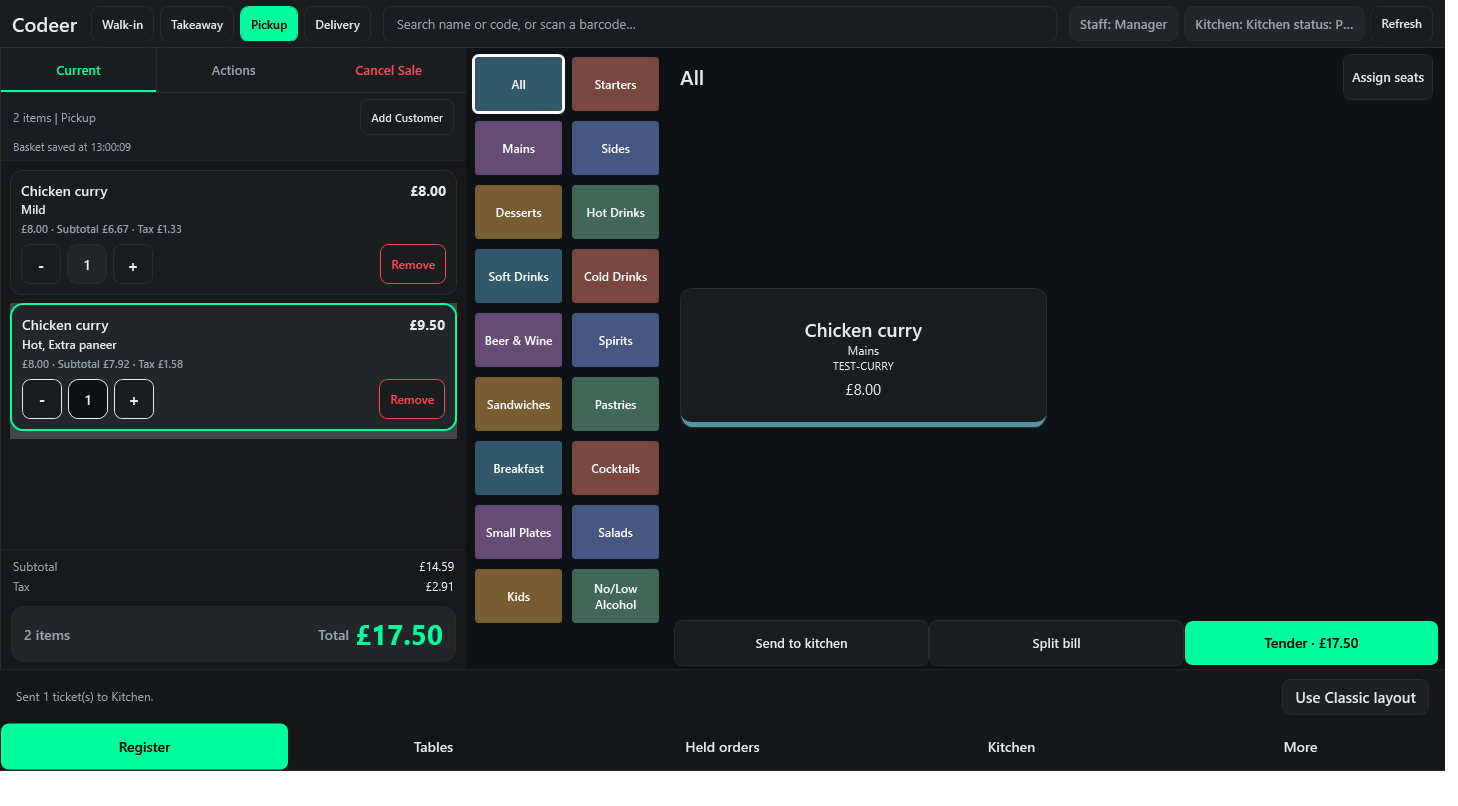
1. Enter two dishes with different instructions
The till held two £8 chicken curries: one mild, one hot with a £1.50 paneer extra. The total was £17.50. The order was set to Pickup with “Collection 18:30”. For dine-in service, separately test opening the correct table, adding a later course and recalling that order.
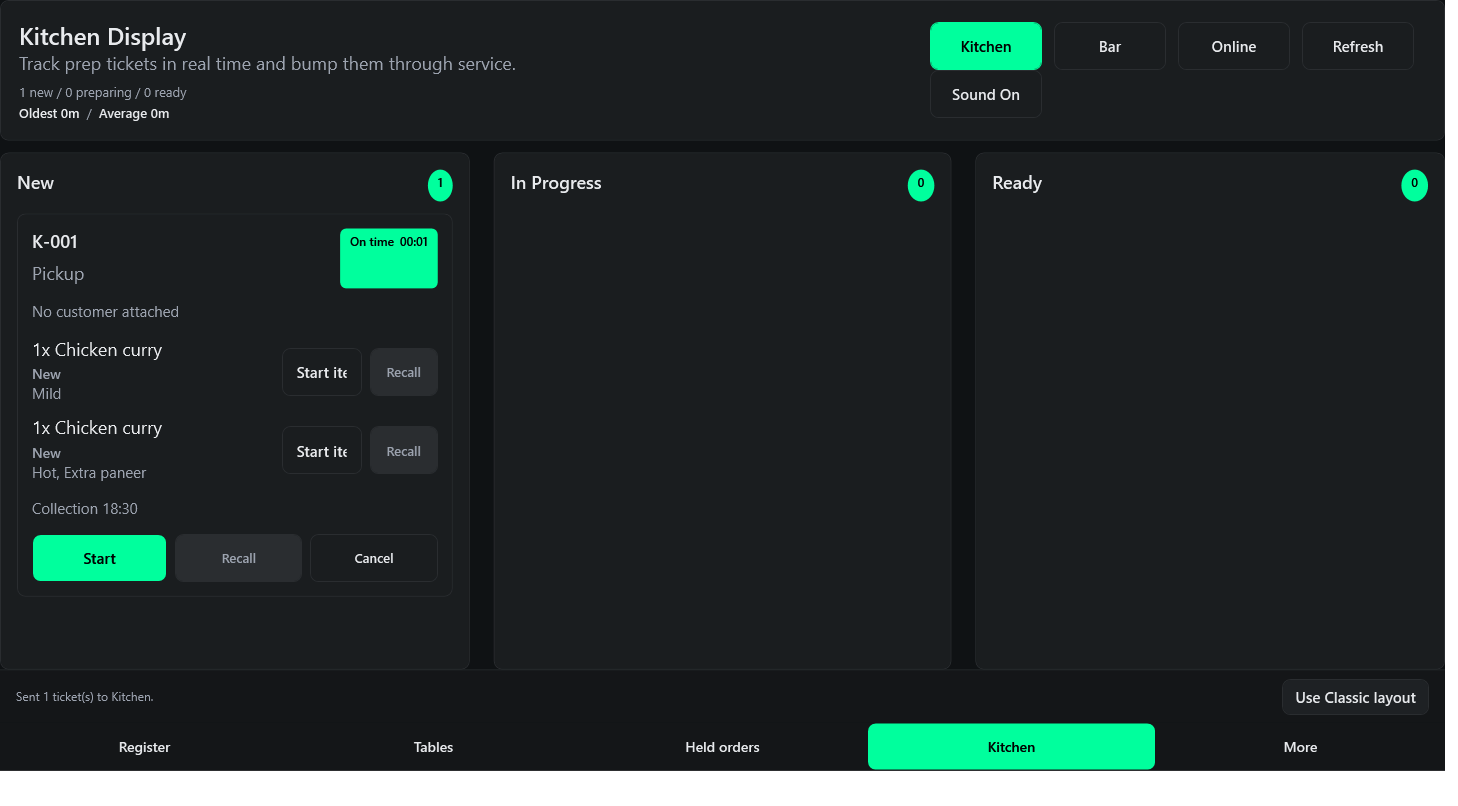
2. Correct the kitchen ticket before payment
Removing the £1.50 extra reduced the till total to £16. On the same K-001 ticket the cook saw “Changed from Hot, Extra paneer to Hot”. The mild curry and collection time stayed unchanged. Sending again left one ticket with two portions.
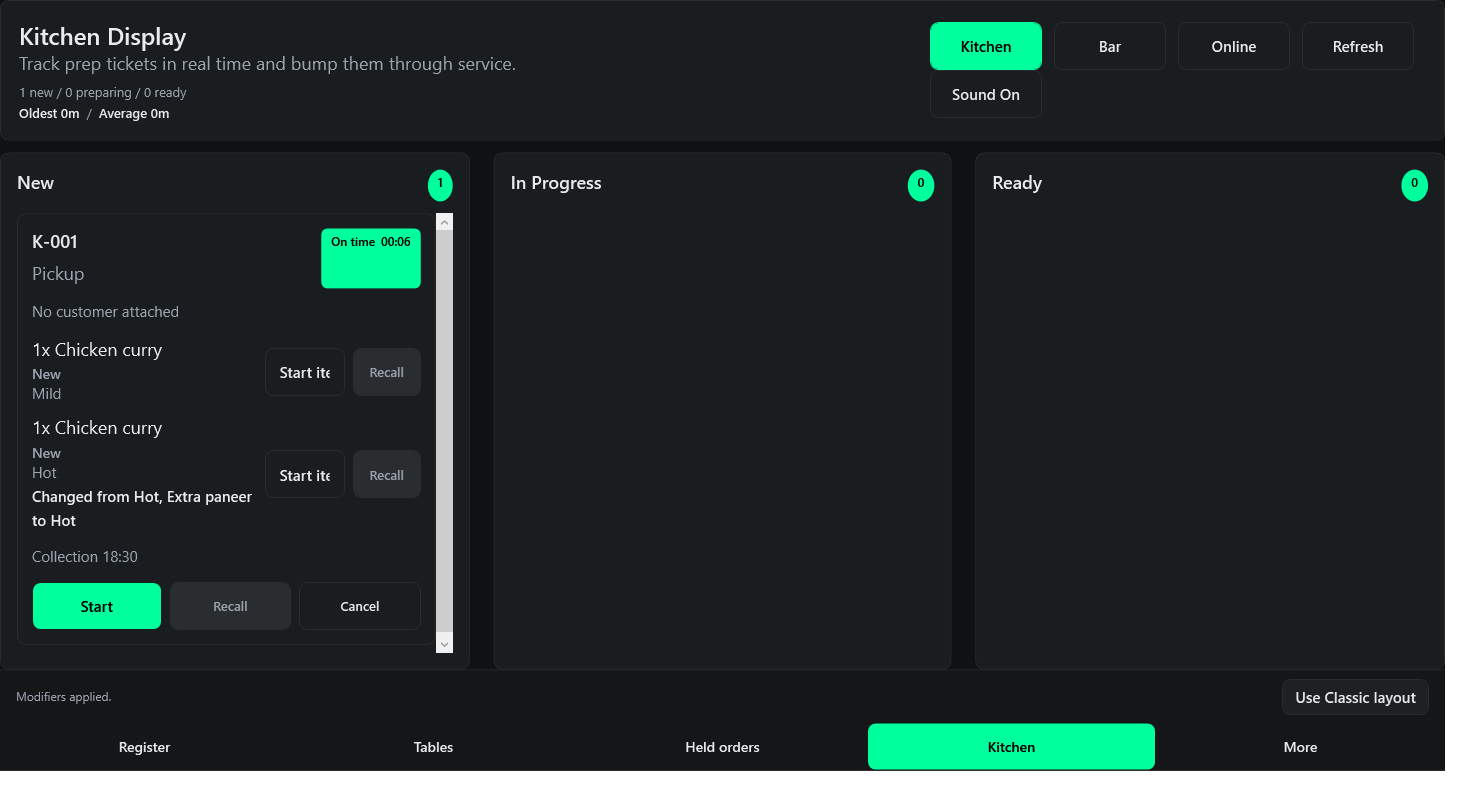
A digital kitchen ticket is not a paper-printer test. Check your actual printer, kitchen screen and network before using this workflow in service. See the full test setup, hardware and limitations.
3. Settle the bill and check the end-of-day figures
Next check to run, not a result from the recording: settle the corrected £16 order using the payment method you intend to offer. Expect no outstanding balance and £16 recorded once, not £17.50 or £33.50. If you offer split payments, test £6 cash plus £10 card and confirm both entries. Check any card transaction against the processor’s own record.
With a £100 opening float, that £6 cash payment and no other cash movements, expected drawer cash is £106. Review the transaction list and daily close, count the drawer, then check corrections and refunds separately. Follow the end-of-day reconciliation guide.
What can I try for free?
The local Windows pilot is £0. Equipment, payment processing and optional setup services are separate. Cloud and Cloud with Menu Assistance are planned upgrades, not included in the current local pilot. Register with your business email and use the same email for online activation.
Try the free restaurant EPOS pilot
Check what free EPOS includes before choosing equipment or optional services.